How to add text button on flash flip shopping catalog?
I want to add a button with "buy now" text on my flash flip shopping catalogue. How can I make it work?
With Flip Shopping Catalog , the PDF file not only can be converted to flash catalogue with page turning effect but also can be inserted text button on the flash catalogue page. It means users can add a button with customized text such as "buy now" "buy" "sale" and so on. Then let’s show you the specific steps.
1.Import Shopping Catalogue: click "Import Shopping Catalogue (PDF)" button to add PDF file to program and then click "Edit Shopping Cart" on top to continue;
2.Find “Text Button: move to "Edit Page for Shopping Cart" window then find out "Text Button" icon which is ranked third in the toolbar;
3.Draw frame: click “Text Button†and then draw a frame on flash catalogue page and go to “Text Button Properties†options window;
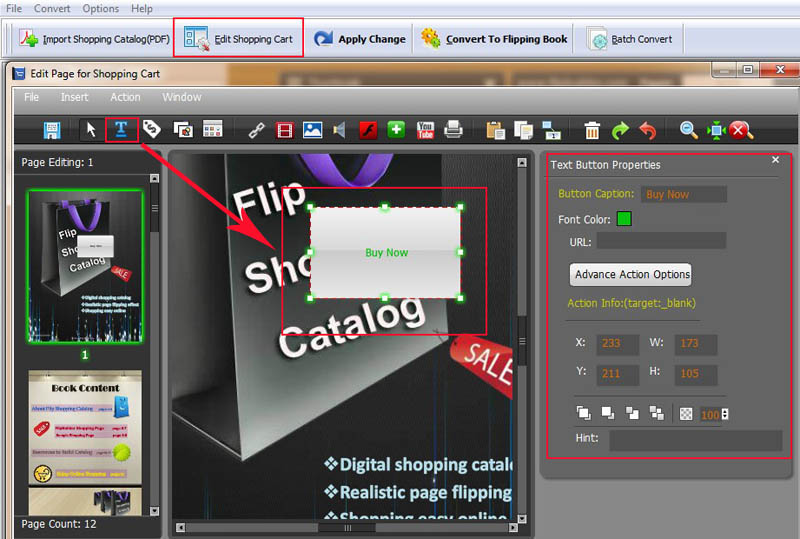
4.Text Button Properties: change the text on button in "Button Caption" option, change font color on “Font Colorâ€, enter the URL when click on the button, change the size by dragging the frame directly;
5.Advance Action Options: users can add some action for "text button" such as go to page, open a link, photos slideshow and so on.
